

How to Work from Bed Without Ruining Your Back

Working from bed is not inherently bad for your back. Working from bed the wrong way is. Most WFH professionals who work from bed do so with a laptop flat on the mattress, their neck bent 30 to 45 degrees forward, and zero lumbar support. That combination causes real damage over weeks and months. This guide shows you how to do it correctly.
Why Most Bed Setups Cause Back and Neck Pain
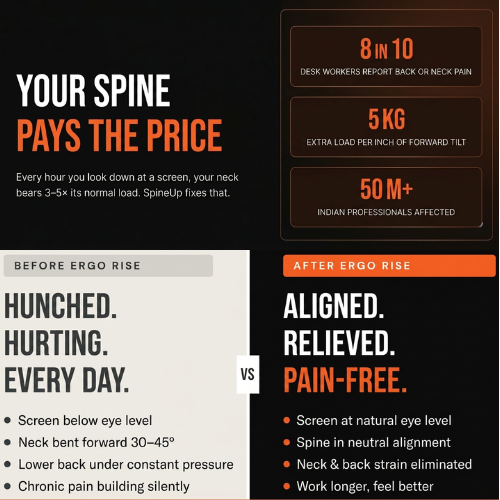
The problem is not the bed itself. It is what a bed does to your posture when you have no ergonomic support. A flat mattress is soft and squishy — your hips sink, your lower back rounds, and you immediately lose the neutral lumbar curve. The laptop on your lap or on the bed is too low, so your head drops forward. You end up in a deep C-curve from tailbone to neck, with every structure in your spine under sustained compressive load.
Do that for an hour and you feel it. Do it for 8 hours a day over months and you develop chronic lower back pain, tech neck, and in some cases disc problems.
The 4 Most Common Mistakes
This is the single most damaging position. The screen ends up 40 to 60 cm below eye level, forcing a severe forward head tilt for hours. Your neck muscles are supporting 18 to 27 kg when you just weigh 5 kg. This alone causes most tech neck from bed working.
This position flattens your lumbar curve and puts sustained pressure on your sacrum and coccyx. After 30 minutes you naturally slump backward, making it worse.
Cross-legged positions reduce blood flow to the legs and externally rotate the hip joint for extended periods. Fine for 20 minutes, harmful beyond that.
Sitting on a mattress against a headboard without lumbar support means the lower back is unsupported and typically rounded. A pillow behind your lower back is the minimum fix.
How to Set Up an Ergonomic Bed Workspace
Three elements determine whether working from bed hurts you or does not:
- Screen height. Your laptop screen must be raised so the top is at or near eye level. This eliminates forward head tilt. On a bed, the only practical way to do this is a lap desk with a built-in raised platform.
- Lumbar support. Your lower back needs support in its natural inward curve. A lumbar pillow, bed pillow, or rolled blanket behind the curve works. Your back should not be rounded at the base.
- A stable flat surface. The lap desk must be firm and stable. Soft surfaces under a laptop flex and wobble, which means your wrists and forearms are constantly micro-adjusting.
The Tool That Makes It Possible: Fold Mate Portable Ergonomic Laptop Desk
A full foldable lap desk with a raised platform that brings your screen to a usable height from bed, sofa, or floor. Magnetic lock mechanism keeps it stable during use. Space for laptop and mouse. PU finish. Holds up to 20 kg.
The Fold Mate solves the core problem of working from bed: there is no stable, elevated surface for your laptop. A regular laptop stand requires a hard flat desk. The Fold Mate creates that surface anywhere you sit. The raised platform brings the screen up enough to meaningfully reduce forward head tilt. Most people who switch to the Fold Mate notice a difference within the first session.
Frequently Asked Questions
Is it ever okay to work from bed every day?
Yes, if you do it correctly. The key factors are screen height, lumbar support, and taking a posture break every 45 to 60 minutes. Many professionals work from bed successfully long-term with the right lap desk.
How long is too long to work from bed at a stretch?
Without ergonomic support, 20 to 30 minutes is the threshold where damage starts to accumulate. With a proper lap desk and lumbar support, most people can work for 60 to 90 minute blocks comfortably.
Can I use a pillow instead of a lap desk?
A pillow provides some cushioning but no stability and no elevation. It does not raise the screen meaningfully and shifts and flattens under the laptop's weight. It is significantly worse than a proper lap desk for posture.
What if I work from both a desk and bed during the day?
The Fold Mate works on any surface, not just a bed. You can use it on a desk, a dining table, or a sofa. It is the only product that solves all three surfaces without switching setups.
What about neck strain from video calls in bed?
Without elevation, your camera is at chest level, which forces your head down and also makes you look bad on calls. A raised screen positions the camera at eye level, fixing both the posture issue and the video call angle.
Work from bed. Do it right.
Join 3,000+ WFH professionals across India who use SimpleObjectz to make their home setup actually ergonomic. Free shipping. 6-month warranty.
Free shipping across India · 6-month warranty · 3-day returns