

7 Signs Your Home Office Setup Is Slowly Damaging Your Spine

Most spinal damage from desk work does not happen in one dramatic moment. It builds slowly, sign by sign, over months of small bad habits your setup quietly forces on your body. The good news is that each sign has a direct fix, and most of them cost less than a single doctor's visit. Here are the 7 warning signs Indian professionals most commonly ignore and what to do about each one.
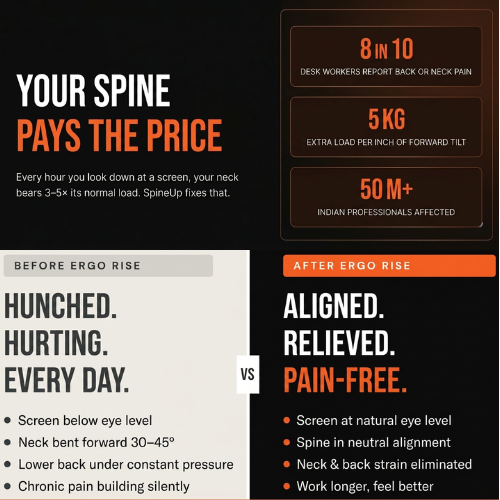
You sit down fine at 9 am and by 12 noon your neck is stiff and sore. This is the clearest sign your screen is too low. When a laptop sits flat on a desk, your head drops 30 to 45 degrees forward, putting the equivalent of 18 to 27 kg of load on your cervical spine. Four hours of that and the muscles are simply exhausted.
Someone catches you on a video call and you notice your shoulders are rounded, your head is jutting forward, and your back is curved. You did not consciously choose that posture. Your setup did it for you. A low screen pulls your head forward. A chair without lumbar support lets your lower back collapse. Your body finds the path of least resistance, and that path curves.
That constant tightness across the top of your shoulders comes from a keyboard that is too high for your arms. When the laptop is flat on a desk at standard height, your shoulders subtly elevate all day to reach the keys. Eight hours of that equals eight hours of unintentional shoulder shrugging.
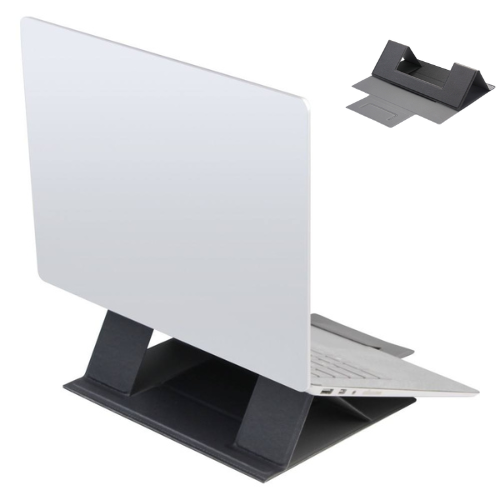
Raises your screen to eye level in seconds. Folds flat, fits 11 to 17 inch laptops.
Tension headaches that start at the base of your skull are almost always caused by sustained neck muscle strain. When the suboccipital muscles are chronically tight from forward head posture, they refer pain upward as a headache.
Long calls mean long periods of sitting still. If your chair does not support the natural inward curve of your lower back, the lumbar muscles work constantly. They fatigue, you slump, the discs compress, and the dull ache sets in.
Wrist pain from typing is usually a sign the keyboard is at the wrong height or angle, forcing your wrists to bend upward or downward constantly. This compresses the carpal tunnel over time.

This is the most telling sign of all. If your neck and back recover significantly when you are not working, your pain is not a medical condition. It is your setup. Two days away from your desk is enough, and then Monday morning brings it all back.
A complete foldable lap desk for bed, sofa, desk, or travel. Magnetic lock, PU finish, holds up to 20 kg. Trusted by 3,000+ professionals.
How Do You Fix Your Setup Without Starting Over?
The three highest-impact changes: screen height, keyboard position, and lumbar support. Fix them in that order.
- Screen to eye level first. A laptop stand or lap desk does this immediately.
- External keyboard second. Once the screen is raised, the built-in keyboard is too low.
- Lumbar support third. A rolled towel, lumbar cushion, or ergonomic chair all work.
Frequently Asked Questions
How do I know if my screen is at the right height?
Sit upright in your normal working posture. The top of your screen should be roughly level with your eyes. If you are looking down at all, the screen is too low.
Can a bad desk setup permanently damage my spine?
Prolonged poor posture can lead to lasting postural changes if uncorrected for years. For most people the damage is reversible with the right setup changes and targeted stretching.
Which SimpleObjectz product fixes the most signs at once?
The Fold Mate addresses the widest range of issues because it corrects screen height and keyboard positioning across any surface. The Ergo Rise at Rs. 999 is the faster entry point if you always work at a desk.
How often should I take breaks from sitting?
Every 45 to 60 minutes at minimum. Stand up, walk for 2 to 5 minutes, and do a quick neck roll and shoulder shrug.
Fix all 7 signs. Start today.
Join 3,000+ Indian professionals who have already upgraded their setup. Free shipping. 6-month warranty.
Free shipping across India · 6-month warranty · 3-day returns